
HUB -
These setup diagrams below are designed to provide solutions fo these setup will provide the best sound using our loudspeakers in your room or studio.
Remember in-


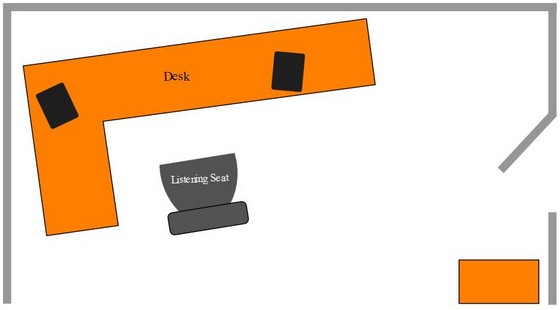

Wall
Speakers
Furniture



Note:
As you can see, the desk is slightly turn at an angle away from the corner of the wall. This is something that musicians or composers will do in their setup .This will help reduce unwanted bass boast and vibration which can be bad for mixing your music.
As you can see, this is your unusual desktop setup. It involves placing the loudspeakers
on a desk directly in front of you away from the wall. Placing the speakers close
to the wall will add a slight bass boast with the rear firing ports. Remembers vented/ported
speakers should be place at least 12” from the wall. As you can see they are Slightly
toe-
As you can see from the diagram, the left speaker is placed slight away from the far corner of the wall. This is offend done my musicians and audio By placing speakers that way, this help reduce bass boast or boominess (that can color the sound and make your Speakers and Music sound more bassier than they are, which is a no no for audio composers.
Desktop SETUP
Vented / Bass Reflex Speakers
ROOM 2 SETUP
Vented / Bass Reflex Speakers
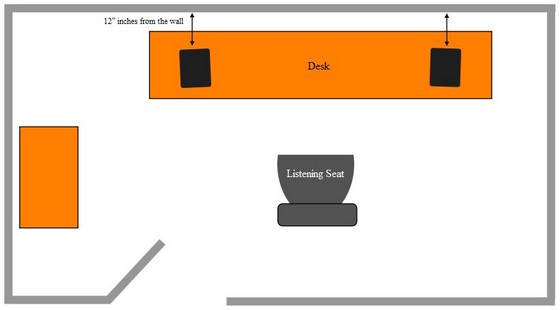
As you can see, this is your basic desktop setup. It involves placing the loudspeakers
on a desk directly in front of you close to the wall. By placing the speakers close
to the wall, this will add a slight bass boast with the rear firing ports. Remembers
small vented/ported speakers should be place at least 12” from the wall. As you
can see they are Slightly toe-
Desktop Speaker & Studio Monitor
Placement

For *
The High lighted speaker model in the *gray box above is the model speaker that is design for the diagram setups and placements below. The other models in the white boxes can be used can be used in the same setup as well, with similar results
Please
Note:
Below is a guide designed to illustrate how to set up your speakers properly to ge the must accurate sound possible. This setup applies to Studio monitor speakers and desktop speakers.
Diffuser


LM-
LCR-

Setup 1